
I get scam calls. Everyone does. I ignore most of them. Anything marked "scam likely" or from a number I don't recognize goes straight to voicemail. But yesterday my phone rang and caller ID said Google. I have a stack of Google accounts, so I answered.
That was my first mistake. Mistake is maybe too strong. I caught on before any damage was done. But it was the door that everything else walked through.
The call#
The voice on the line told me there was a suspicious fraud alert on my account. Calm, professional, clearly reading from a playbook. But a well written playbook.
I went in with my guard up. I didn't volunteer my name, my email, or my phone number. None of the things you'd normally hand over to "verify" yourself. Didn't matter. They already had all of it.
They also knew I build applications and work with APIs, which they worked into the story. The "attack" had come from a compromised API key. When I asked which key, they said they couldn't share that until after Google had completed its investigation. A smart dodge. Enough technical specificity to sound legitimate, enough vagueness to never actually be tested.
How they knew me#
The personalization was convincing. It also isn't magic. My name, email, and phone number live on breach data aggregators, probably from at least one of the many breaches the internet has been through over the years. My LinkedIn says what I do. My GitHub and personal site fill in the technical picture. You don't need a single dramatic leak to build the profile I got pitched back to me on the call. You need an afternoon and a couple of data broker subscriptions.
The useful reframe: a call or email matching your public profile is not evidence of insider knowledge. It's evidence that someone did fifteen minutes of homework.
The email that was actually from Google#
They offered to open an investigation. Said I'd get a confirmation email. A minute later, there it was in my inbox. Clean, official looking Google Workspace email with a case ID and an agent name. The caller asked me to confirm the agent name, and already knew the case ID before I read it out.
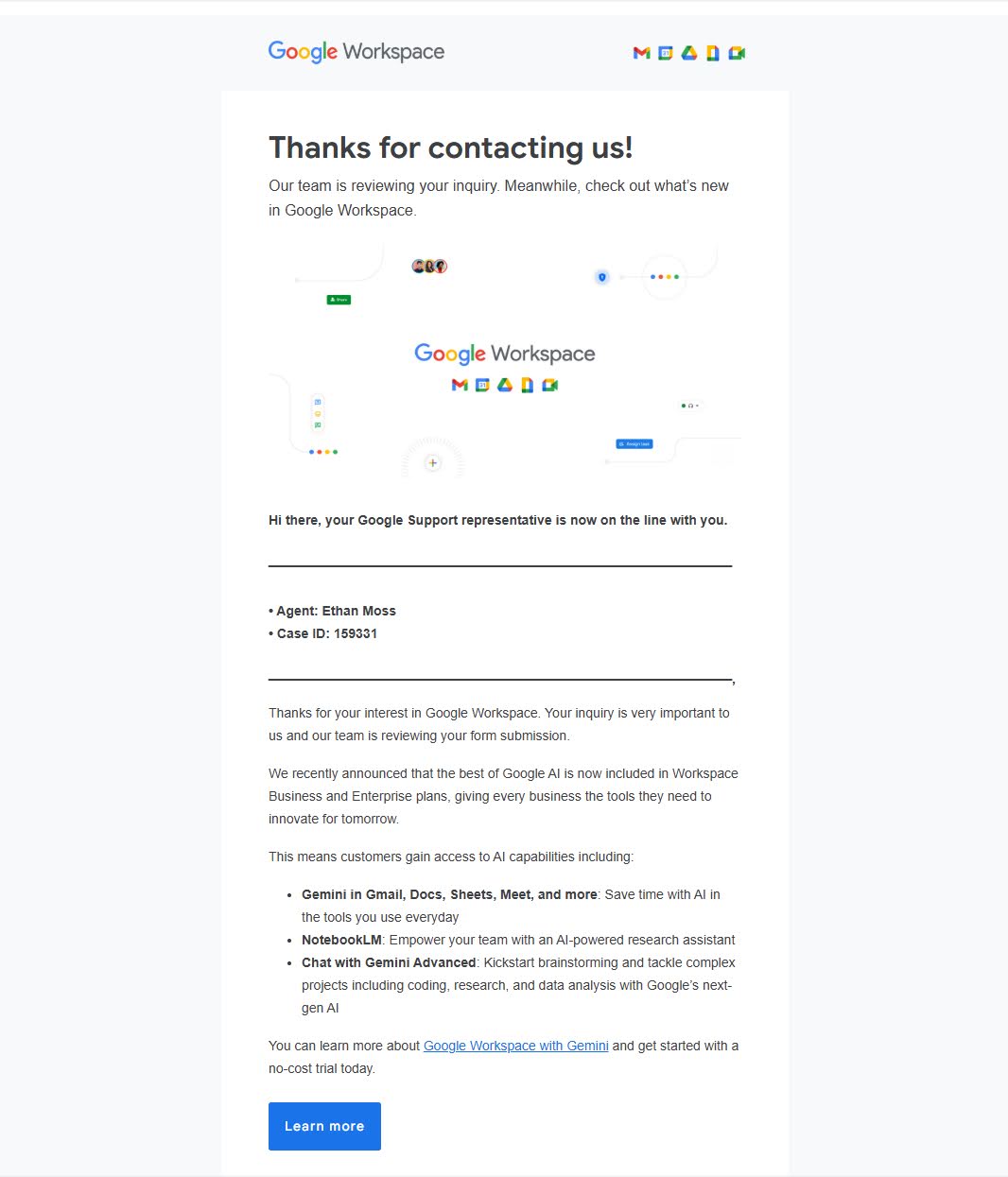
My first move was to check the headers. SPF, DKIM, DMARC, all passing. The email really was from google.com.
I didn't figure out the mechanism until after the call, and this is the part I most want to share, because it's what makes the whole scam work. Google Workspace has a public sales contact form. When someone submits it, Google fires off an automated confirmation to whatever email address was entered. The scammers submit the form with your email address and inject custom text (the "agent" line, the fake case ID) into one of the form fields. Google's template plugs it in and sends the whole thing through Google's real mail servers.
It isn't spoofing. It isn't phishing in the usual sense. It's Google's own contact form acknowledgment being used as a prop. Every header check you run will tell you the email is legitimate, because it is legitimate.
The site#
Next, they asked me to navigate to a URL:
sites.google.com/view/ticket-overview/
Red flag one. Yes, sites.google.com is a google.com domain. But Google Sites is a free publishing platform. Anyone can spin up a page there in five minutes. To most people, seeing "google.com" in the URL reads as validation. To anyone who's used Google Sites, it reads as rented office space in a building Google happens to own.
The page itself was well done. Matching typography, clean layout, and a "Security activity log" under a red banner that read Unusual activity detected. Confirm each event below. Three flagged events:
Phone number change to an unfamiliar number.
Recovery email added, an address I'd never seen before.
New device sign-in from an "Android Device Motorola s200."
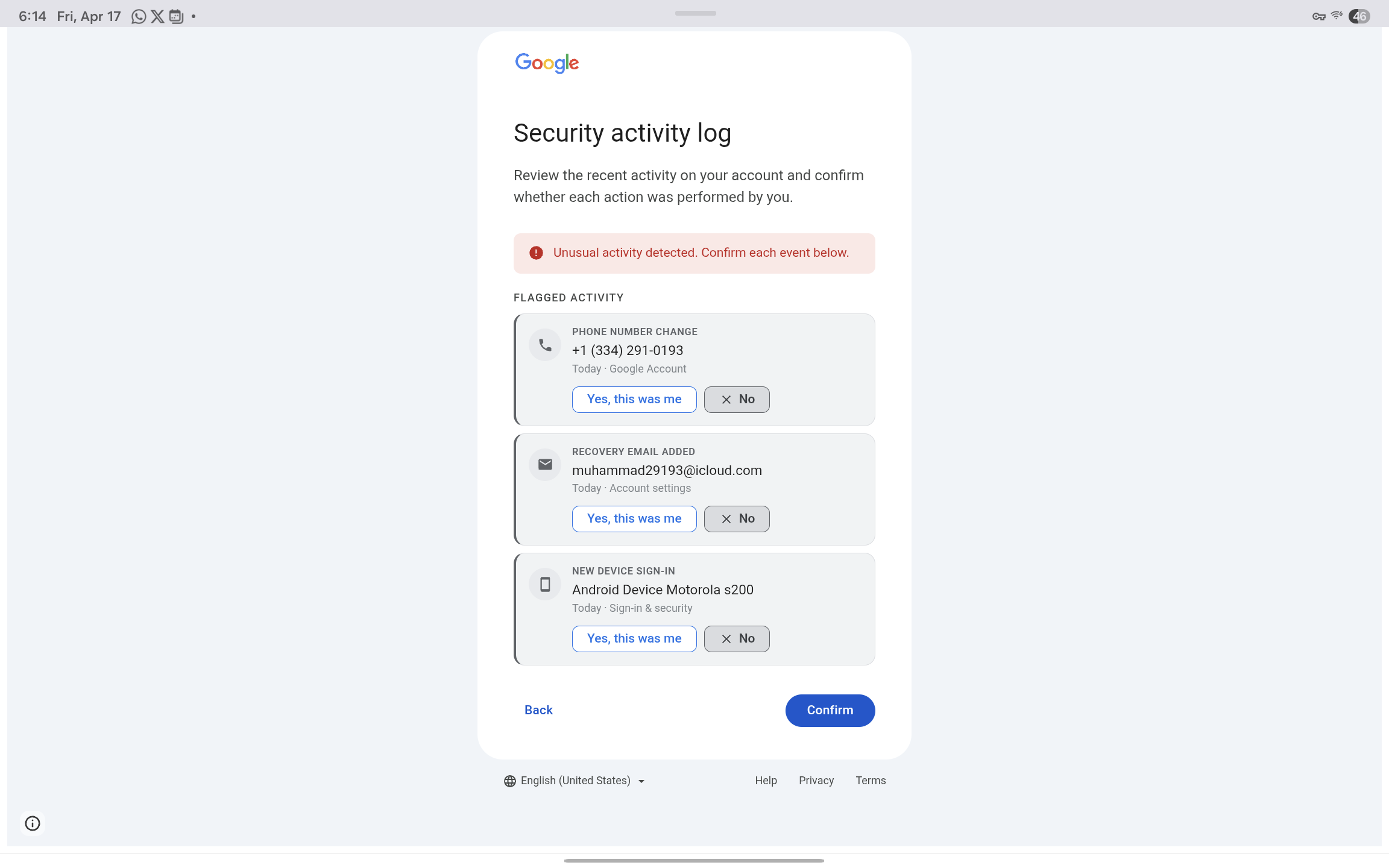
The fake Google Security activity log page hosted on sites.google.com, listing the phone number change, recovery email addition, and Motorola s200 sign-in as
Each item had a friendly Yes, this was me button and a more prominent No button, with a big blue Confirm at the bottom. The layout was built to put you in a panic and march you forward one click at a time.
Worth a beat to appreciate what's actually going on here, because it's clever. The "log of the attacker's activity" isn't a log. It's a preview of what the scammer is going to do to your account once you hand over your password. The recovery email they've supposedly already added? That's the one they'll use for takeover. The phone number they've supposedly changed? Theirs, for the 2FA codes. You aren't being shown evidence of a breach. You're being shown a shopping list. The urgency is the thing they're about to do.
I'd bet real money AI helped build this page. The polish was there. The caller walked me through the log and told me the fraudulent activity had come from a Motorola device. I asked for the model. He said "Motorola S22."
The page said "Motorola s200." Lowercase s.
A Motorola S200, I learned in about four seconds of searching while he was still talking, is a Bluetooth earpiece from the mid 2000s. Not a phone. Red flag two. Creative attack vector though.
The login page#
I didn't log in, but I played along long enough to see where the site led. Every path ended at the same place: a fake login page that was, visually, an exact copy of Google's. Same "G" logo, same Sign in / Use your Google Account text, same Create account / Next buttons, same Not your computer? Use a Private Window to sign in fine print. If you showed me a screenshot next to the real one without context, I'd have trouble picking which was which.
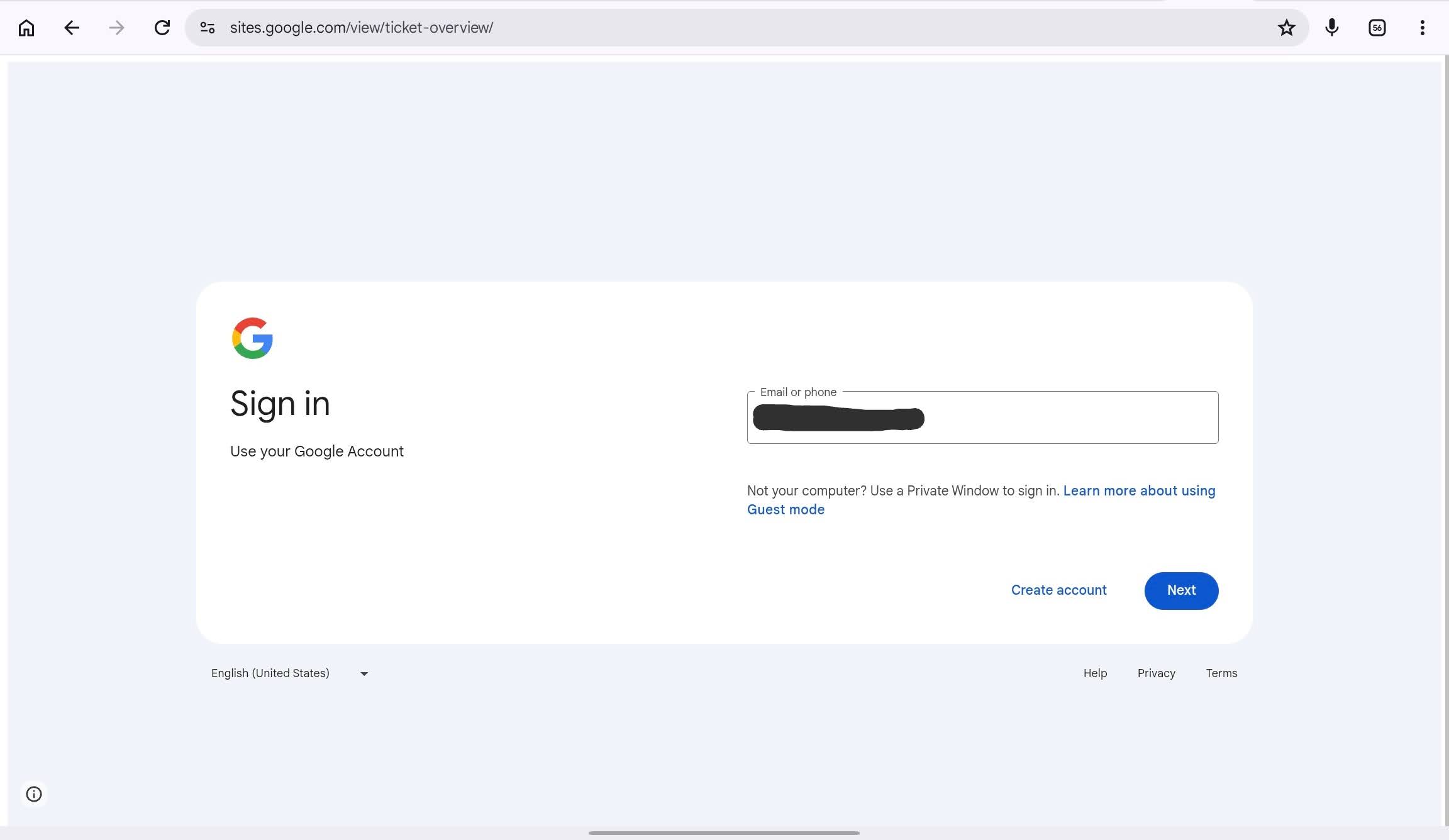
The fake Google sign-in page still sitting at sites.google.com/view/ticket-overview/, a pixel accurate copy of the real accounts.google.com login
The only difference, and it is the entire difference that matters, is the URL. The real Google login lives at accounts.google.com. This one was still sitting at sites.google.com/view/ticket-overview/. That's it. That's the whole tell. A password typed into that form goes to the scammer, not to Google.
That's where I stopped. My goal at that point was to keep the guy on the phone as long as possible while I poked at the site and searched for existing reports on the URL. Nothing came up. The page had been created two days earlier. These sites are disposable. Spun up, used, abandoned. Which is why the usual "is this URL a known scam?" checks don't help much.
The tell at the end#
I kept him on the phone for over twenty minutes. Asked questions, poked holes, watched him handle them. He was articulate and patient, didn't escalate when I refused to log in, just calmly informed me that if I didn't take action, Google couldn't be held responsible for any resulting compromise.
The last thing I asked was when I'd hear back about the investigation. He said it could be days, weeks, months, or years.
That's when I knew I'd never hear from "Google" again.
Why it worked as well as it did#
Three pieces stacked together:
Spoofed caller ID showing "Google."
A real confirmation email from a real google.com address.
A convincing site hosted on a real google.com subdomain.
On its own, a careful person might catch any of those. Stacked, they reinforce each other. If you don't know caller ID can be spoofed, the email confirms it. If you don't know how the email trick works, the google.com URL confirms it. If you don't know Google Sites is a free publishing platform, the polished page confirms it.
The person on the other end isn't winging it. The script is tight. The infrastructure is real Google infrastructure being abused in clever ways. The landing page is two days old, which is why search didn't flag it. This is scam as a service, with product polish.
And AI is making the defender's job harder, not easier. The visual work, the plausible copy, the ability to adapt on a live call, all of it is cheaper to produce than it used to be. Every productivity gain for legitimate work is also a productivity gain for this.
If you take one thing away#
Google does not call you. Not like this. Not about "suspicious activity on your account." If your phone rings and caller ID says Google, hang up and go to myaccount.google.com yourself. If there's a real problem, it will be waiting for you there.
Everything else is set dressing: the email, the case ID, the URL, the audit log, the calm professional voice on the other end. The only link in the chain you actually control is the one where you decide to type your password. So don't.
If you already clicked through#
If you're reading this because you just handed over your password to one of these pages, don't panic. But move fast. Rough order:
Reset your Google password. From a different device if you can.
Go to myaccount.google.com and open the Security page. Check your recovery email, recovery phone, and 2-Step Verification methods. Remove anything you didn't add.
Review your active devices and sessions. Sign out anything you don't recognize.
Look at the real activity log for phone number changes, recovery email additions, new app passwords, or unfamiliar third party access.
If you reused that password anywhere else, change it there too. This is the painful one.
Turn on hardware keys or passkeys. They're the one defense that still works when the attacker already has your password.
If the scammer got far enough to change your recovery email or phone before you got there, you're looking at Google's account recovery flow, which is a thing you don't want to be learning in real time. Faster is better.
Report it#
If you want to help the next person:
Report it to Google at https://safebrowsing.google.com/safebrowsing/report_phish/.
Use the "Report abuse" link at the bottom of the Google Sites page. Takedowns happen fast when pages get flagged.
FTC at reportfraud.ftc.gov.
For US phone scams, FCC at consumercomplaints.fcc.gov.
For internet crime broadly, ic3.gov.
Nothing visible comes back to you for filing these, but aggregated reports are what drive takedowns and platform policy changes. It matters.
If you've run into a variation of this, or spotted a different angle on the contact form abuse, I'd be curious to hear about it.